
At Transformer Homes, we manage every custom build, renovation, and dual occupancy project across Melbourne’s Northern and Western suburbs with a focus on coordination and clear communication. That commitment extends to the tools we use behind the scenes. Autodesk Construction Cloud project management is one of those tools, a platform built to connect teams, documents, and workflows across the full lifecycle of a construction project. Understanding what it offers matters whether you’re a builder evaluating new software or a homeowner curious about how your project gets managed from design through to handover.
So what does the platform actually do? It brings together document control, design coordination, cost management, and field execution into a single connected environment. Rather than juggling separate systems for drawings, RFIs, and scheduling, project teams can work from one source of truth. For residential builders handling multiple trades and tight timelines, like the projects we deliver daily, that kind of integration reduces errors and keeps things moving.
This article breaks down the core project management capabilities within Autodesk Construction Cloud, covering its key modules, how they connect, and where the platform fits in real-world construction workflows. By the end, you’ll have a clear picture of what the platform includes, how it supports collaboration, and whether it aligns with the way modern residential construction projects are run.
Why Autodesk Construction Cloud matters on jobsites
Construction projects fail more often from poor communication and fragmented information than from technical problems on site. When a subcontractor works from an outdated drawing, or a site supervisor cannot locate the approved version of a specification, the result is rework, delays, and blown budgets. On a typical residential project in Melbourne, you might have an architect, a certifier, a structural engineer, a building surveyor, and multiple trade contractors all needing access to the same information at different points in the programme. Without a central system, that information scatters across emails, shared drives, printed plans, and individual text message threads. Autodesk Construction Cloud project management addresses this problem directly by connecting every stakeholder to a single, current set of project data from the first design file through to the final handover document.
The cost of disconnected systems
Working with disconnected tools carries a genuine financial cost that compounds as a project grows in complexity. For residential builders, the impact shows up in practical problems: a missed RFI response delays a frame inspection, a subcontractor quotes from the wrong plan revision, or a handover package arrives incomplete because documents were stored across too many separate locations. These are not rare events; they happen regularly on complex builds where teams rely on separate systems that do not talk to each other. Each incident adds time and cost that neither you nor your client budgeted for at the start.
When every team member works from the same live document set, the risk of version-related errors drops sharply across every trade on site.
For your project team, moving from scattered systems to a connected cloud environment reduces the hours spent tracking down information and increases the hours spent building. It also creates a clear, timestamped audit trail, which matters when disputes arise or when a building surveyor requests documentation at an inspection stage. Having that record available instantly, rather than hunting through inboxes, protects your project and your relationships with clients.
How real-time visibility changes decisions
One of the most practical advantages of the platform is the ability to see project status in real time without waiting for a weekly report to land in your inbox. A site manager can log an issue from the field, attach photos as evidence, assign the item to a subcontractor, and track resolution without leaving the mobile app. A project director sitting away from site can view outstanding RFIs, check budget movement, and review quality inspection results on the same day those events occur. That speed of information moves teams from reactive to proactive, which is where the real savings on a construction project come from.
For builders running multiple sites simultaneously, this visibility becomes even more important. You can monitor whether a concrete pour passed its inspection, whether a variation has received written approval, or whether a critical document has been reviewed and accepted, all without making a phone call or waiting on an email reply. The platform gives your team access to accurate, current information regardless of physical location, which is exactly what residential construction across Melbourne’s Northern and Western suburbs demands given how quickly trades rotate between jobs.
Why the residential sector specifically benefits
Volume builders and project home companies have long had structured systems, but custom residential builders have historically managed with lighter, less connected tools. The gap that creates becomes visible on any job where a client variation triggers a cascade of document updates across drawings, specifications, and trade scopes. A platform that links those updates across modules means your team catches the knock-on effects before they reach the site, not after. That layer of control is what separates a smooth client experience from one filled with surprises.
How Autodesk Construction Cloud handles project management
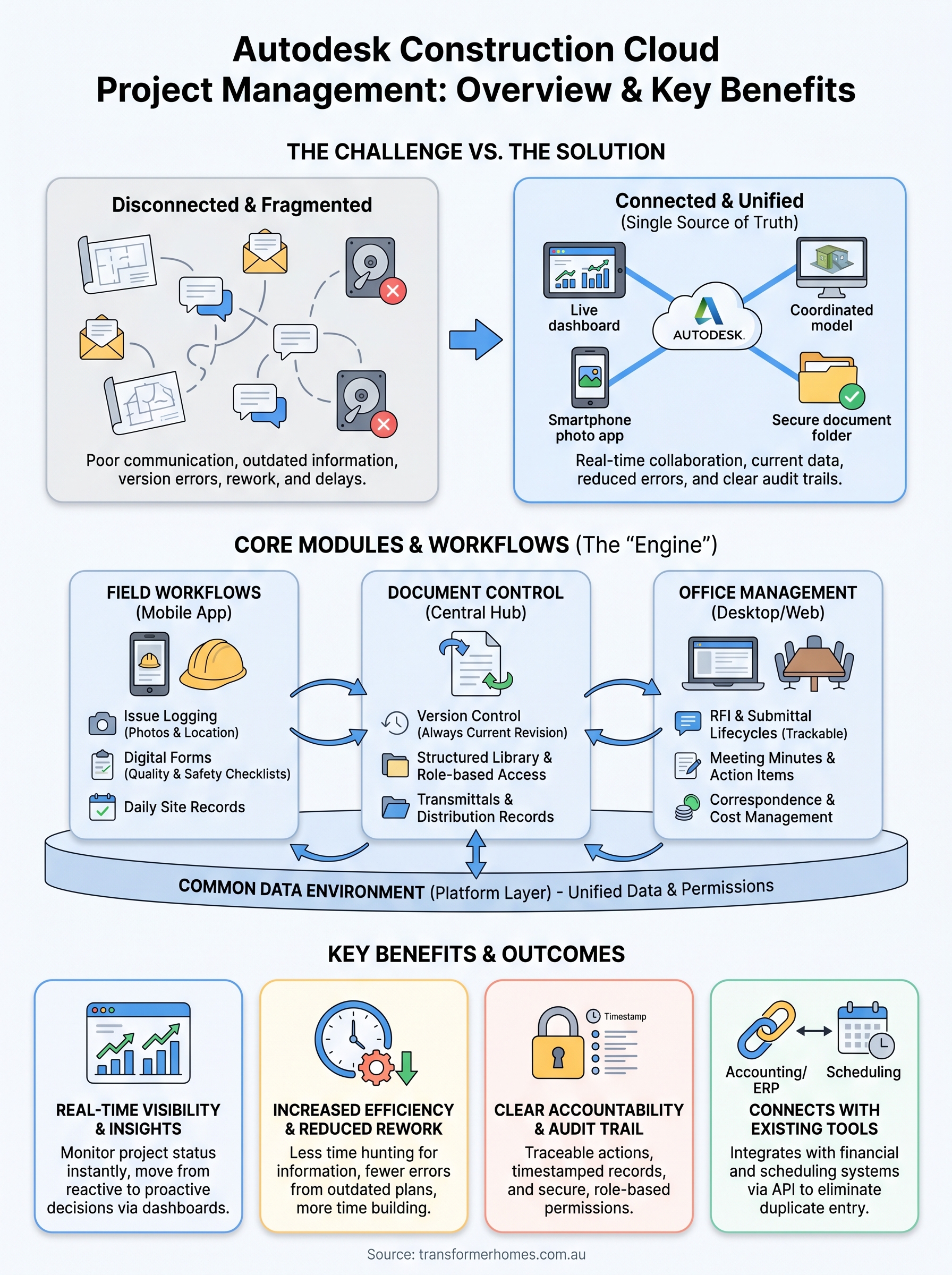
Autodesk Construction Cloud project management organises work through a set of connected modules that each serve a distinct phase or function. Rather than treating project management as a single feature, the platform separates it into dedicated tools that link together so information created in one area flows automatically into others. You get a structured environment where every team member operates within the same data set, and nothing gets lost between systems because there is only one system to work within.
A layered architecture built for construction
The platform sits on a common data environment called the Autodesk Construction Cloud platform layer, which underpins every product within the suite. This layer handles authentication, file storage, and data sharing so that products like Autodesk Build, Autodesk Takeoff, and BIM Collaborate all pull from and push to the same underlying project record. When you update a document in one product, that update is immediately visible to every connected module, which removes the duplication that typically slows residential construction teams down.

A single connected data environment means your team is always looking at the same current project record, whether they’re on site or in the office.
Each product within the suite targets a specific functional need without creating silos. Autodesk Build handles field execution, document management, and project controls. BIM Collaborate manages design coordination and clash detection. The products share data rather than duplicate it, so your site supervisor, project manager, and design team all work with consistent information across their respective tools.
Roles, permissions and accountability
The platform uses a role-based permission system that controls who can view, create, edit, or approve content within each module. You can assign a subcontractor access to only the drawings relevant to their scope, while your project manager holds full administrative rights across every module. This structure keeps sensitive information secure and ensures every action is traceable back to a specific person with a specific timestamp.
From a practical standpoint, accountability improves when everyone knows their actions are recorded. Your team members receive notifications when tasks are assigned, documents are updated, or approvals are required. That closed-loop workflow keeps your programme moving without relying on informal follow-ups or chasing messages across separate communication channels.
Core tools: RFIs, submittals, meetings and correspondence
The day-to-day administration of a construction project generates a substantial volume of formal communications. RFIs, submittals, meeting minutes, and correspondence each carry legal and contractual weight, and losing track of any one of them creates risk for your project and your business. Autodesk Construction Cloud project management organises these processes into structured, trackable workflows so your team handles each item consistently and nothing falls through without a record.
Managing RFIs and submittals in one place
An RFI in the platform follows a defined lifecycle from creation through to close-out. Your site supervisor raises the query, attaches the relevant drawing or specification, assigns it to the appropriate respondent, and sets a due date. The system sends automatic notifications, tracks the response, and links the completed RFI directly to the affected document so anyone reviewing that drawing later can see the clarification that was issued. You get a full audit trail without maintaining a separate log in a spreadsheet.
Submittals work in a similar structure. You create a submittal register at the start of the project, populate it with required items across trades, and manage the review and approval cycle within the platform. Each submittal tracks its revision history, the reviewers involved, and the dates at which each action occurred. For residential projects where a certifier or engineer must approve materials before installation, having that record available instantly removes the scramble at inspection time.
A properly closed submittal register at project completion gives your client and certifier a single document that proves every required approval was obtained.
Meetings and correspondence
The meetings tool lets you create agenda items before a meeting, record minutes during it, and distribute action items immediately after. Each action item carries an owner and a due date, and the platform tracks whether those actions are completed or overdue. Your project manager does not need to chase attendees by email because the system surfaces outstanding items automatically in the relevant team member’s dashboard.
Correspondence management captures formal letters, notices, and instructions within the same environment as your other project records. You can link a piece of correspondence to a specific RFI, variation, or drawing so that the full context of a decision sits in one place. For residential builders managing client relationships across a multi-month build programme, that level of organisation protects the project record and keeps your client communication professional throughout.
Field workflows: issues, photos, forms, quality and safety
Construction happens on site, not in an office, and autodesk construction cloud project management reflects that reality by putting powerful field tools directly into your team’s hands through a mobile app. Your site supervisor, trade foreman, or quality inspector can log issues, capture photo evidence, complete digital forms, and record safety observations all from the one application without returning to a desktop to update records. That immediacy keeps your project data current and reduces the gap between what happens on site and what your project team knows about it.
Logging and resolving issues
When something on site does not meet the required standard, your team can raise an issue directly from the mobile app, attach photographs taken on the spot, assign it to the responsible subcontractor, and set a due date for resolution. The platform tracks the full lifecycle of each issue from creation through to close-out, so your project manager always knows how many items are open, who owns them, and how long they have been outstanding.

Resolving issues within the platform rather than through separate text messages or emails keeps your project record complete and defensible.
Your team can also link issues to specific locations on a drawing or floor plan, which makes it straightforward to identify patterns, such as a recurring defect in a particular trade’s work or a consistent problem in one area of the building.
Photos and digital forms
Photo capture in the platform does more than store images. Each photo carries a timestamp, GPS location, and the name of the person who took it, and you can link it directly to an issue, inspection, or daily log. That metadata turns a simple photograph into documented site evidence that holds up during disputes or at handover when your client expects a thorough record of how the work progressed.
Digital forms replace paper-based checklists across your entire project. Your team completes quality inspection checklists and safety observation reports in the app, with responses captured in a structured format that feeds directly into your reporting dashboards. You can build custom forms to match your specific quality and safety requirements, so the data you collect reflects the standards your business operates to rather than a generic template someone else designed for a different type of project.
Document control and a single source of truth
On any residential construction project, drawings and specifications change constantly. A structural engineer issues a revised footing detail, an architect updates a window schedule, or a certifier requests amendments to a fire separation wall. Without a controlled system, those changes create a version management problem where different members of your team work from different revisions without realising it. Autodesk Construction Cloud project management solves that problem by maintaining a single, authoritative document set that every team member accesses from the one location, regardless of whether they are on site, in the office, or working from home.
Version control and drawing management
Every time you upload a new revision of a drawing, the platform automatically supersedes the previous version and makes the latest file the default for anyone opening that document. Your subcontractors cannot accidentally download an outdated plan because the system directs them to the current revision by default. Previous versions remain accessible for reference and audit purposes, but the platform clearly marks them as superseded so there is no confusion about which file carries authority on site.
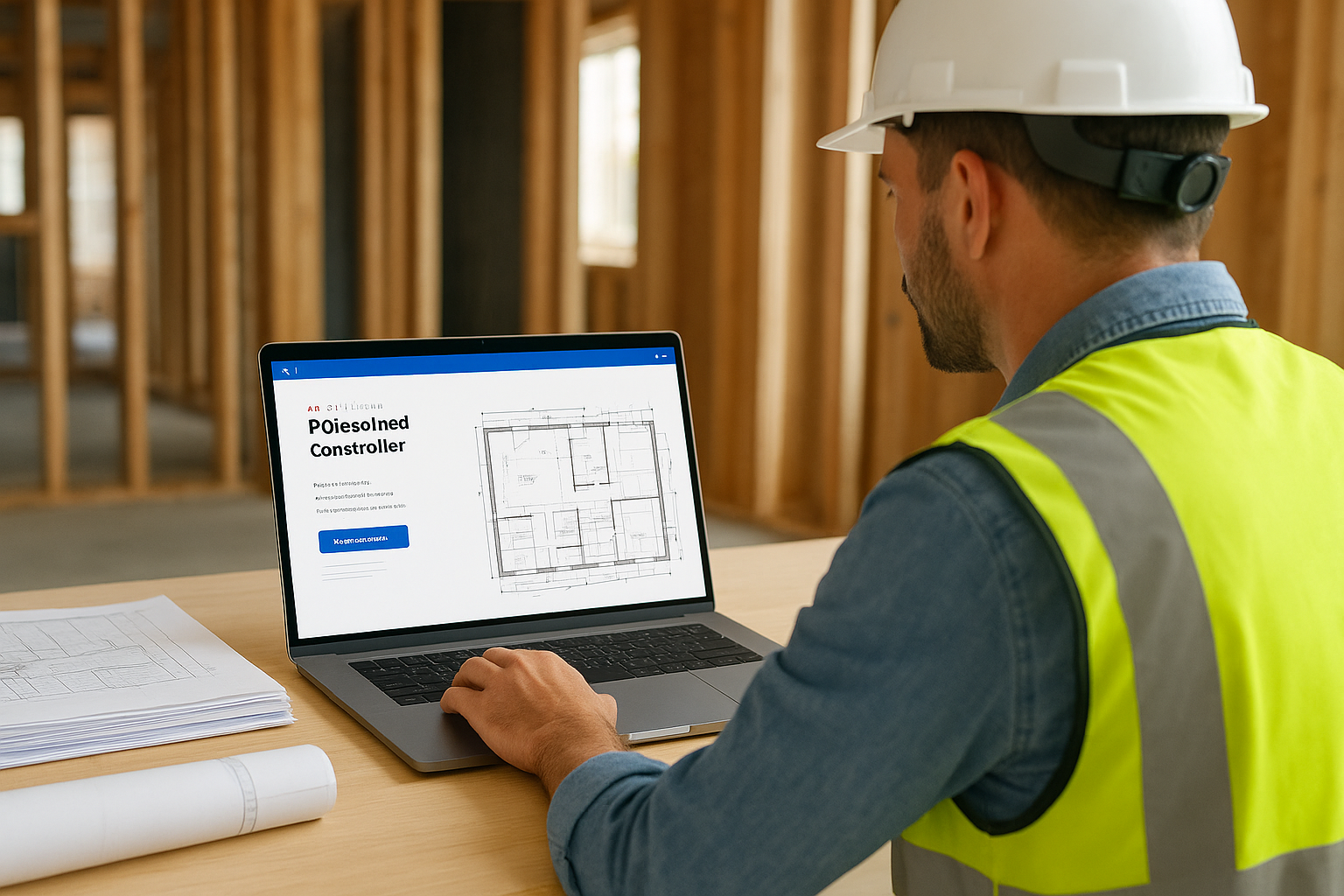
Keeping every team member on the current revision eliminates the most common cause of rework on residential builds: people following drawings that no longer reflect the approved design.
You can also organise your document library by discipline, trade, or building area, which makes it straightforward for a subcontractor to locate only the files relevant to their scope. A plumber does not need to navigate through structural drawings to find the hydraulic services plan; the folder structure and permission settings bring the right documents to the right people without requiring your project manager to manually distribute files each time a revision is issued.
Transmittals and document distribution
When you need to formally issue a drawing set or specification package to an external party, the transmittals tool handles the process within the same environment as your document library. You select the files, assign recipients, and the platform generates a numbered transmittal record that captures what was sent, to whom, and when. Recipients receive a notification and can access the documents directly rather than waiting on a file transfer email that may end up in a spam folder or arrive with a broken link.
Your transmittal register builds automatically as you issue documents throughout the project, giving you a complete distribution history that you can reference during inspections, disputes, or at final handover without reconstructing records from memory or searching through old emails.
Reporting, dashboards and predictive insights
Data collected across every module in Autodesk Construction Cloud project management only delivers value if you can see it clearly and act on it quickly. The platform turns the information your team generates daily into structured dashboards and reports that give you an accurate picture of project health without requiring hours of manual data compilation. Rather than waiting until something goes wrong to understand your project’s status, you can monitor key indicators continuously and respond before small issues compound into larger ones.
Real-time dashboards for project oversight
Your project home dashboard surfaces the metrics that matter most across RFIs, issues, submittals, and budget in a single view. You can see at a glance how many RFIs are overdue, what percentage of quality inspections have passed, and whether any safety observations remain unresolved. Each figure links directly to the underlying records, so a single click takes you from a summary number to the specific items driving it without navigating through separate modules or running a manual report.
When your project data updates in real time, your decisions are based on what is actually happening on site rather than what happened last week.
You can also configure custom dashboards to match your reporting priorities. A project director focused on budget performance sees different metrics than a site supervisor tracking open defects. That flexibility means every member of your team gets the view that matches their role without information overload.
Understanding trends and anticipating problems
The platform analyses patterns across your project data to surface trends that a spreadsheet would not reveal. If your team logs a high volume of issues in a particular trade over a short period, the reporting tools make that pattern visible so you can address the underlying cause rather than resolving individual items one at a time. For residential builders managing multiple active sites, this kind of trend visibility is the difference between proactive site management and constant reactive firefighting.
Custom reports let you pull specific data sets across any combination of modules, export them for client meetings, and schedule automated distribution to your team on a regular cadence. Your project manager spends less time building reports and more time using them, which is exactly the outcome a well-configured reporting environment should produce.
Integrations, data access and working with other tools
No construction business runs on a single platform. Your team likely uses accounting software, scheduling tools, or enterprise resource planning systems alongside Autodesk Construction Cloud project management, and the platform is built to connect with those existing tools rather than replace them entirely. That means the data your team captures on site does not sit in isolation; it feeds into the broader systems your business already depends on, reducing duplicate data entry and the errors that come with it.
Connecting with accounting and ERP systems
The platform supports integrations with widely used financial and enterprise systems so your project costs, variation approvals, and budget movements can flow between environments without your team re-entering figures manually. When a variation is approved within the platform, that approval can trigger an update in your accounting system, keeping your financial records and project records aligned without a separate reconciliation step at the end of each month.
Connecting your project management and financial tools eliminates the lag between a site event and its impact on your project budget.
Your team can also integrate with scheduling tools to link programme milestones directly to field activities, so a delay logged in the field has an immediate, visible effect on your overall schedule rather than surfacing later during a progress meeting. That connection keeps your programme accurate and gives you a realistic picture of your delivery date without manual updates.
API access and custom connections
For teams with specific workflow requirements, the platform provides open API access that lets your developers build custom integrations between Autodesk Construction Cloud and internal systems. If your business uses a proprietary quoting tool, a custom client portal, or a bespoke reporting environment, you can connect those systems to the platform’s data layer so information flows in the direction your workflow requires. You are not locked into a fixed set of pre-built connectors.
Accessing your project data through the API also means you can build dashboards in tools your team already uses, such as Microsoft Power BI, without asking your project managers to learn a new reporting interface. Your data remains inside the Autodesk environment while your team views and analyses it through whichever presentation layer suits your business. That flexibility matters when you are scaling across multiple active projects and need consistent reporting without additional software overhead.
Implementation checklist for teams in Australia
Rolling out Autodesk Construction Cloud project management across your team requires more than creating an account and uploading drawings. Australian builders operate under specific regulatory and compliance requirements, including National Construction Code documentation, building surveyor submissions, and Domestic Building Contracts Act obligations, that shape how you configure the platform from day one. Working through a structured checklist before your first live project saves time and prevents the kind of setup mistakes that are difficult to undo once your team is actively using the system.
Getting your configuration right before your first project goes live is far easier than restructuring a live system with active trades already working inside it.
Getting your account and licences in order
Before you invite a single subcontractor or upload a drawing, confirm which Autodesk product licences your team actually needs. Not every member of your business requires a full Autodesk Build licence; subcontractors and trade contractors can often access shared projects through a free project member account, which reduces your software costs without limiting the core workflows your project team relies on. Speak with an authorised Autodesk reseller in Australia to confirm your licensing structure matches your current project volume and your planned growth over the next twelve months.
Once licences are in place, set up your account admin structure with clearly defined hub administrators, project administrators, and member roles. Assigning the wrong permission level early creates security gaps or restricts team members from completing tasks, both of which slow your project down before it starts.
Structuring your first project correctly
Your folder structure and document numbering conventions determine how easily your team finds information throughout the project lifecycle. Establish a consistent naming convention for drawings, specifications, and correspondence before your first document is uploaded, and apply it uniformly across every project your business runs. A standardised structure means a new site supervisor can navigate the document library on their first day without requiring a guided walkthrough from your project manager.
Configure your RFI, submittal, and issue workflows to match the approval chains your business already uses. Map out who reviews and closes each item type, set realistic due date defaults that reflect typical Australian trade response times, and test every workflow with a dummy project before you go live. That preparation step consistently reduces early adoption friction for residential construction teams across Melbourne and beyond.
Where to go from here
Autodesk Construction Cloud project management covers a broad set of capabilities, and the right starting point depends on where your team currently feels the most friction. If document control is the issue, start there. If field workflows and quality inspections are slowing your team down, configure those modules first and build outward from a working foundation rather than attempting to activate everything at once.
For residential builders in Melbourne, the platform works best when it reflects how your specific project delivery model operates rather than a generic template built for a different sector. Take the time to map your existing workflows before you configure anything, and test each module with a real project before your whole team relies on it daily.
Seeing how a builder puts these principles into practice makes the difference between theory and application. Visit the Transformer Homes team to learn how we coordinate trades, manage documents, and deliver custom builds across Melbourne’s Northern and Western suburbs.
