
Running a home build or renovation without a solid plan is a recipe for blown budgets and missed deadlines. At Transformer Homes, we know firsthand how critical structured project management is, coordinating subcontractors, tracking materials, and keeping clients informed across every stage of construction demands clear, organised systems. That’s exactly where Smartsheet project management templates come in. They give you a ready-made framework to plan, track, and manage complex projects without building everything from scratch.
Whether you’re a homeowner mapping out a kitchen renovation or a small-scale developer juggling a dual occupancy build, the right template can save hours of setup time and keep your project on track. Smartsheet’s platform makes it straightforward to customise these templates to suit your specific scope, and many are available for free in formats like Excel, Word, and PDF if you prefer working outside the platform.
Below, we’ve rounded up eight of the best free Smartsheet project management templates purpose-built for planning, so you can spend less time on admin and more time making progress.
1. Project management plan template
The project management plan template is the foundation of any well-run project. It gives you a single document where you capture your scope, schedule, resources, and responsibilities before a single task kicks off. Smartsheet’s version of this template is structured to guide you through every planning layer, so nothing slips through the gaps early on.
What this template includes
This template covers the core planning elements you need from day one: project scope, objectives, deliverables, timeline, stakeholder roles, risk register, and communication plan. Each section prompts you to fill in the details that define how your project runs, rather than leaving you to figure out the structure yourself. You get a ready-made framework instead of a blank page.
Best for
A project management plan template suits mid-to-large projects where multiple stakeholders, trades, or teams need clear alignment before work starts. If you’re managing a home addition, a dual occupancy build, or any project with overlapping responsibilities, this template gives everyone a shared reference point from the first briefing through to practical completion.
Key sections to complete first
Start with the project scope and objectives before anything else. If the scope isn’t locked down, every other section becomes guesswork. After scope, fill in your key milestones and assign an owner to each deliverable. These three steps alone will surface most of the questions you’d otherwise hit mid-project, when changes are far more costly to absorb.
Defining your scope before scheduling prevents the most common source of cost blowouts and timeline drift on residential construction projects.
How to customise it for your team
Smartsheet lets you add, remove, or rename columns to match your team’s language and workflow. If you’re working with subcontractors, add a "Trade" column next to the owner field so accountability is visible at a glance. You can also adjust the status dropdown values to reflect the stages your team actually uses, rather than generic labels that don’t map to your real process.
Common mistakes to avoid
The biggest mistake is treating the plan as a one-off document you complete at the start and file away. Your plan should be a live reference that you update as scope shifts, risks change, and timelines move. A second common error is leaving the risk register completely blank because it feels premature at the planning stage. Filling it in early, even with rough estimates, pushes your team to think ahead rather than react under pressure.
2. Integrated project plan with Gantt template
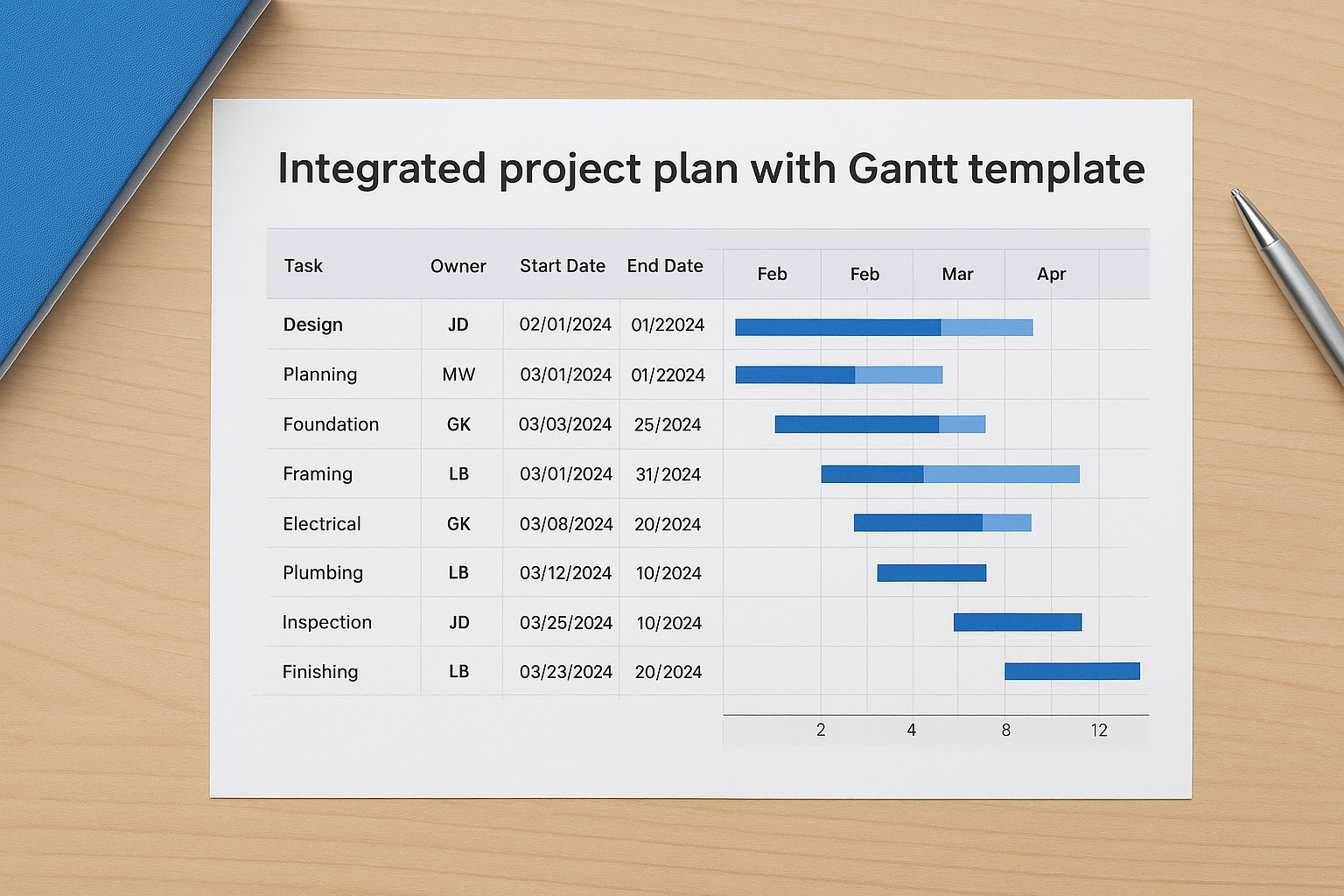
The integrated project plan with Gantt template combines a task list with a visual timeline in one sheet, giving you a clear picture of what needs to happen and when. It’s one of the most practical smartsheet project management templates for projects with multiple overlapping phases.
What this template includes
This template contains a structured task list on the left and an auto-generated Gantt chart on the right. Each row holds your task name, assigned owner, start date, end date, duration, and percentage complete. As you enter dates, the Gantt bars update automatically, keeping your timeline in sync with the underlying data.
Best for
Teams running multi-phase projects with strict sequencing will get the most from this template. It suits residential construction schedules, home additions, and any project where one task cannot start until another finishes.
How the Gantt view stays accurate
The Gantt view updates whenever you edit a date or duration in the task list. Avoid adjusting bar lengths manually in the chart view, since the task list data drives everything. Keep your dates current and the chart stays reliable.
Gantt accuracy depends entirely on the quality of your date inputs, so update the sheet as soon as any timeline shifts.
How to handle dependencies and milestones
Use the dependency column to link tasks so a delay in one automatically pushes its successors forward. Mark key delivery points as milestones using the dedicated field so they appear as diamonds on the chart and stand out during reviews.
How to customise it for construction and renovations
Add a "Trade" column to flag which subcontractor owns each task. Group rows by phase, such as demolition, framing, and fitout, so your Gantt chart reflects the actual site sequence rather than a generic project structure.
3. Project task tracking template
The project task tracking template gives you a dedicated space to capture, assign, and monitor every task across your project. Unlike a full project plan, this template focuses purely on execution, so your team always knows what’s active, what’s overdue, and what’s coming up next.
What this template includes
This template contains a flat task list with columns for task name, owner, priority, status, start date, due date, and notes. It’s built for day-to-day tracking rather than high-level planning, making it one of the most practical smartsheet project management templates for teams that need a quick, reliable view of live work.
Best for
This template suits fast-moving projects where tasks are added and closed frequently. It works particularly well for renovation teams managing short-cycle work across multiple trades, where a full Gantt chart adds more overhead than it removes.
A focused task tracker cuts through noise and keeps your team’s attention on what actually needs to move this week.
Key columns that make it work
The status and due date columns do the heaviest lifting here. Keep your status options simple, such as Not Started, In Progress, and Complete, so updates take seconds rather than minutes. Add a priority column to flag urgent tasks without relying on colour coding alone.
How to keep owners and due dates clear
Assign one named owner per task, not a team or department. Shared ownership usually means no ownership. Set due dates at the task level, not just the phase level, so accountability is specific and visible to everyone on the sheet.
Tips for fast weekly updates
Block 15 minutes each Monday to scan every open task and update its status. Sort by due date before your review so overdue items surface immediately. Archive completed tasks into a separate section rather than deleting them, so you keep a clean audit trail without cluttering your active view.
4. Multiple project tracking template
The multiple project tracking template gives you a single sheet to monitor several active projects at once, rather than switching between separate files to get a status read. It’s designed for anyone managing more than one project at a time who needs a fast, consolidated view without building a custom dashboard from scratch.
What this template includes
This template includes summary rows for each project alongside key fields like owner, start date, end date, percentage complete, and overall status. Rollup formulas aggregate task-level data into project-level summaries, so you can see how each project is tracking at a glance without drilling into individual sheets.
Best for
This template works best for small-scale developers or project managers running parallel builds, renovations, or staged developments. If you’re coordinating a dual occupancy alongside a separate bathroom renovation, this template keeps both visible in one place without requiring separate systems.
How to organise projects so rollups make sense
Group your rows by project first, then by phase or workstream within each project. This structure lets the rollup formulas calculate accurate summaries at the project level. Keep your indentation consistent across every project block so Smartsheet reads the hierarchy correctly and the parent row totals update as expected.
Consistent row hierarchy is the single biggest factor that determines whether your rollup data is reliable or misleading.
How to standardise statuses across projects
Set a fixed dropdown list for your status column and apply it across every project in the sheet. Using the same status options, such as On Track, At Risk, and Delayed, makes cross-project comparisons immediate and removes any ambiguity when you’re reporting up to a client or stakeholder.
How to use it for portfolio level reporting
Pull your status and completion columns into a Smartsheet dashboard using chart or metric widgets to create a live portfolio summary. This turns your multiple project tracking sheet into one of the most effective smartsheet project management templates for communicating progress across an entire project portfolio without manual reporting.
5. Project budget tracking template
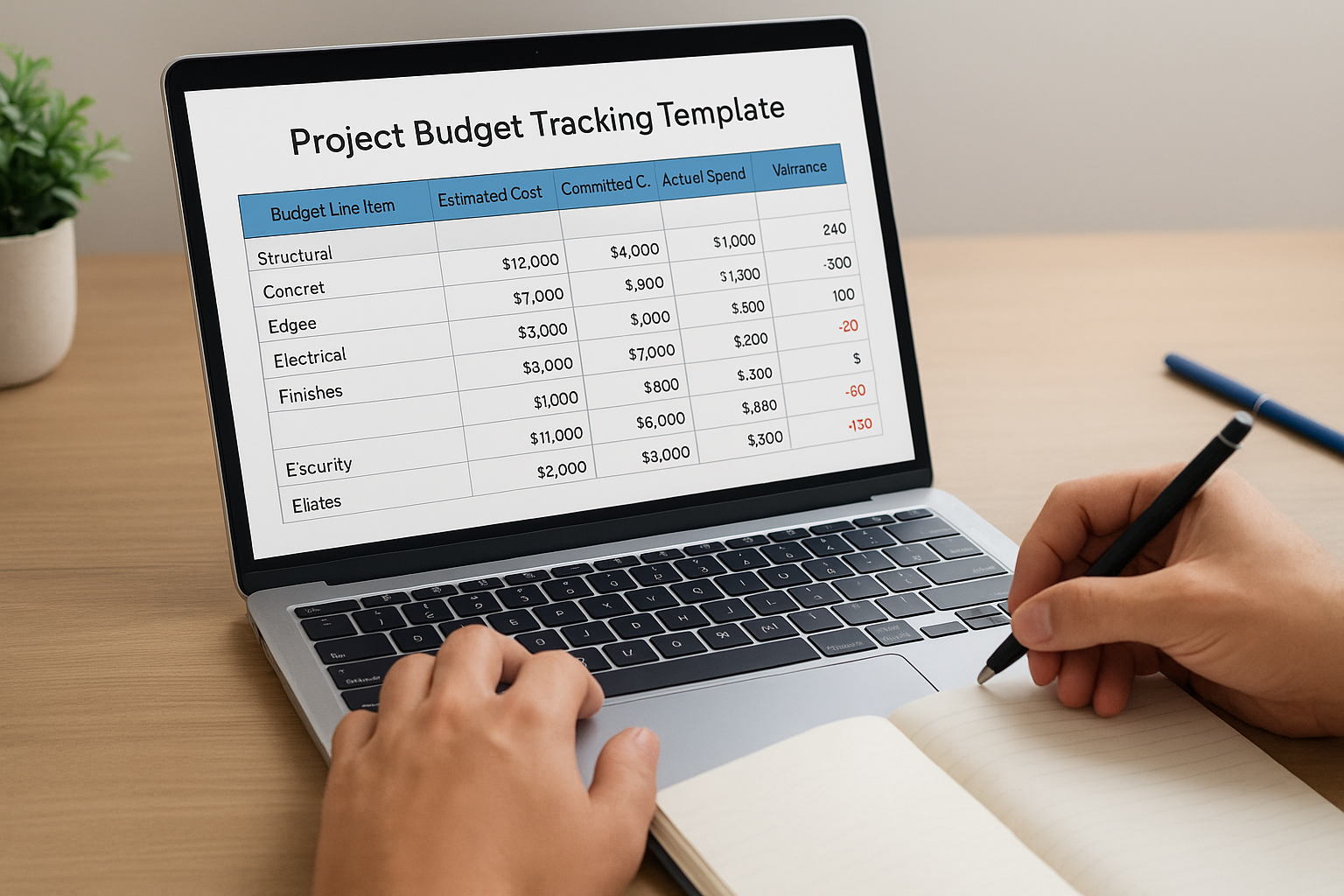
The project budget tracking template gives you a structured way to record every planned cost against actual spend in real time. Without this in place, even well-organised projects can drift financially before anyone realises there’s a problem.
What this template includes
This template contains columns for budget line items, estimated costs, committed costs, and actual spend, alongside a variance column that calculates the gap automatically. You also get category groupings so you can see totals at a summary level without manually adding up individual rows.
Best for
This template suits any project with a defined budget and multiple cost categories, from a full home build to a staged kitchen renovation. It’s particularly useful when you’re managing subcontractor quotes alongside material costs and need a single place to track both.
How to track budget vs actual without chaos
Enter your estimated cost for every line item before work starts, then update the actual spend column as invoices come in. Never wait until the end of a phase to reconcile, since weekly updates keep the variance column meaningful rather than a surprise at the end.
Reconciling costs weekly is the most reliable way to catch budget drift before it compounds into a serious overrun.
How to set up categories and cost codes
Group your line items by trade or cost category, such as structural, electrical, and finishes, and assign a code to each group. This structure makes it far easier to filter your sheet and identify which category is absorbing the most variance at any given point.
How to spot overruns early
Set a conditional formatting rule on your variance column so any negative figure turns red automatically. Scanning these highlighted cells during your weekly review is one of the fastest ways to use smartsheet project management templates to catch problems before they escalate.
6. Project resource allocation tracking template
The project resource allocation tracking template gives you a clear view of who is working on what and how much capacity they have left across your active projects. Without this visibility, it’s easy to overbook your best people while others sit underutilised.
What this template includes
This template contains columns for team members or trades, their available hours, allocated hours per project, and remaining capacity. Summary rows group allocations by week or phase so you can see load distribution at a glance rather than calculating it manually.
Best for
You’ll get the most from this template when coordinating multiple trades or team members across overlapping scopes. If you’re running parallel renovation streams or managing a build with several concurrent subcontractors, this keeps everyone’s workload visible in one place.
How to map capacity vs demand
Enter each person’s available hours per week in the capacity column, then log their allocated hours against each active task. The gap between the two numbers tells you immediately whether your demand exceeds supply before a bottleneck forms on site.
Mapping capacity before assigning work prevents the scheduling conflicts that delay residential projects more than any other single factor.
How to prevent over allocation
Set a conditional formatting rule on the remaining capacity column so any figure below zero highlights in red. Review this column at the start of each week and redistribute tasks before overloaded team members fall behind.
How to adapt it for subcontractors and suppliers
Replace the team member column with company names and trade types, then add a "Lead Time" column for suppliers. This adjustment makes it one of the most practical smartsheet project management templates for managing external partners alongside your internal crew.
7. Agile sprint planning board and Kanban tracker
Smartsheet offers two distinct agile-style smartsheet project management templates that suit teams managing iterative or fast-moving work. Both templates sit within the same family but serve different rhythms, so picking the right one depends on how your team structures its workflow.
Sprint planning board template overview
The sprint planning board template organises work into fixed time boxes, typically one to two weeks, with a defined backlog sitting alongside the active sprint. Each card holds a task title, owner, story points, and status so your team can plan capacity before each sprint kicks off rather than making decisions on the fly.
Agile Kanban project tracking template overview
The Kanban template uses a continuous flow model with columns representing workflow stages such as To Do, In Progress, and Done. Unlike the sprint board, there are no fixed time boundaries, which makes it a natural fit for renovation punch lists or trade coordination work that doesn’t follow a strict cadence.
How to choose between sprint and Kanban
Choose the sprint board when your team commits to scoped work blocks and reviews progress at regular intervals. Reach for Kanban when tasks arrive unpredictably and you need a live view of what’s moving through the pipeline at any given moment.
If your work arrives in unpredictable bursts rather than planned cycles, Kanban will keep your team aligned without the overhead of sprint ceremonies.
Key fields and swimlanes to customise
Add swimlanes by trade or team member so each person’s work is visually separated. Include a priority field and a due date column so high-urgency items stay visible even when the board fills up.
How to keep work in progress under control
Set a WIP limit on your In Progress column, typically two to three tasks per person, to prevent your board from becoming a backlog disguised as active work. Review and clear completed items at least twice a week to keep the board readable and your team focused.
Putting it into practice
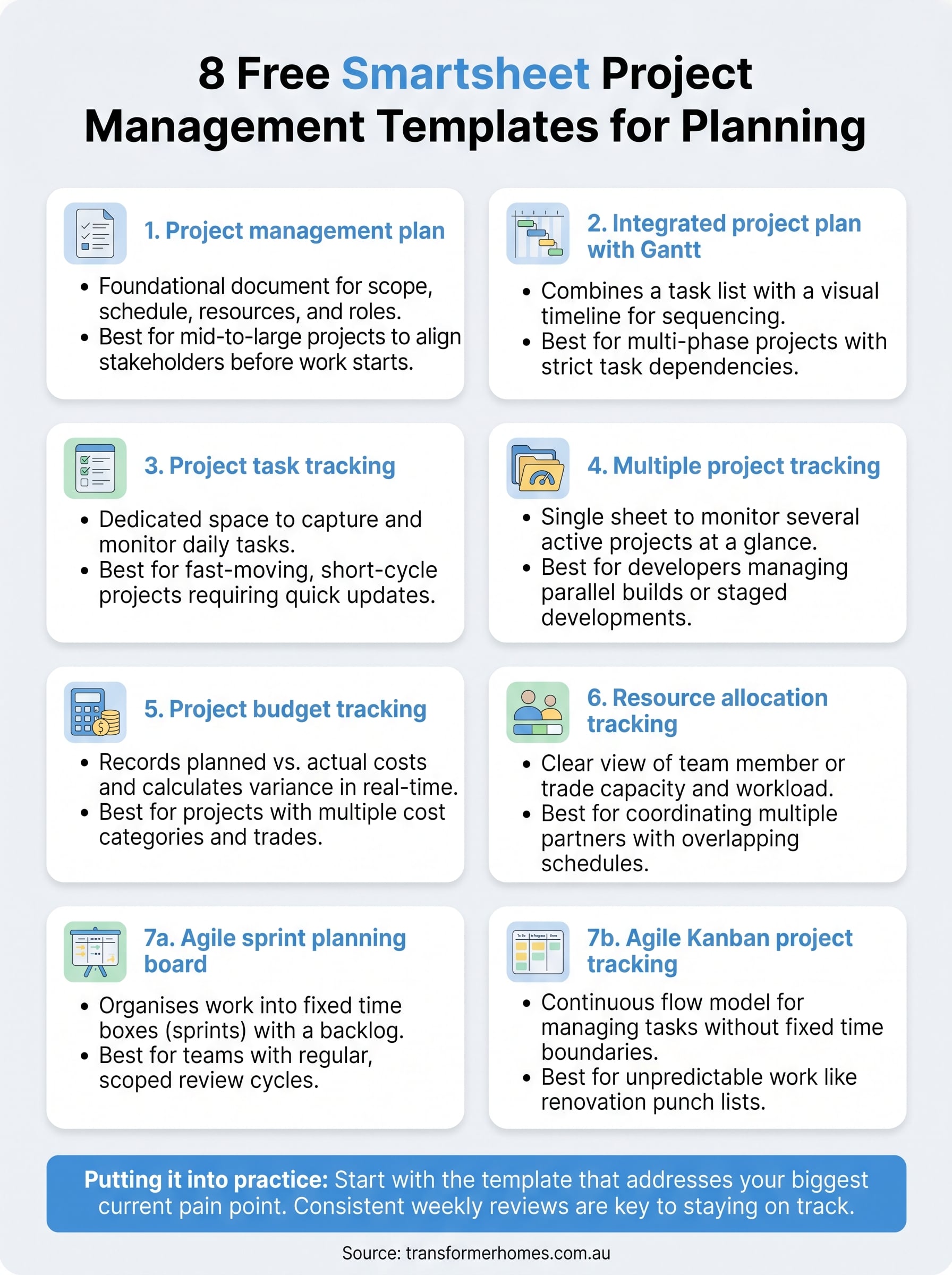
These eight smartsheet project management templates cover every layer of a well-run project, from high-level planning through to daily task tracking and budget control. The key is to start with the template that matches your biggest current pain point rather than trying to implement all eight at once. If your schedule keeps slipping, begin with the Gantt template. If costs are running loose, start with the budget tracker. Build your system gradually and you’ll actually use it.
Once you have your templates set up, share them with everyone who has a role in the project so updates happen at the source rather than through a centralised gatekeeper. Consistent weekly reviews are what separate teams that stay on top of their projects from those that scramble to catch up.
If you’re planning a residential build or renovation and want a team that manages every detail with the same level of care, get in touch with Transformer Homes to talk through your project.
